Jobs Dashboard
Jobs Dashboard
Jobs are batch processing tasks executed in formats like JAR, Raw Scala, SQL, or Python3.
Job Dashboard Overview
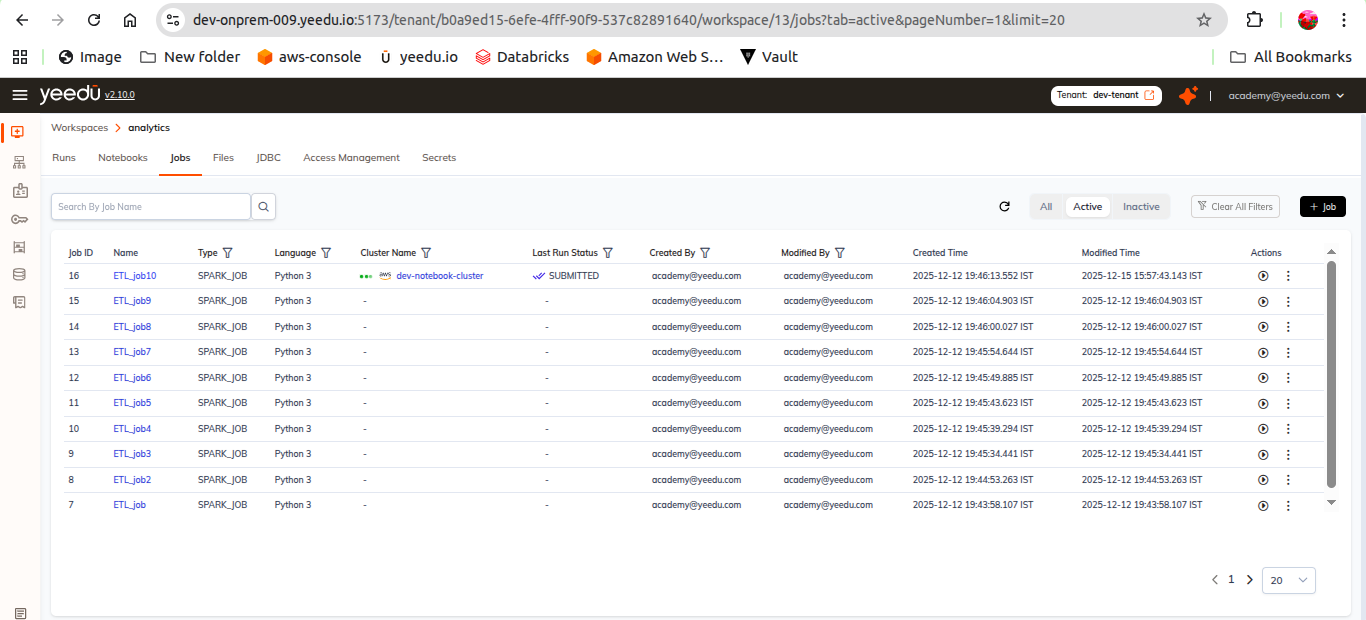
The Job Dashboard displays the following details:
- Job ID: Unique identifier for each job.
- Name: Displays the name of all jobs in the workspace.
- Type: Specifies the job type (Jar, Python3, Raw Scala, SQL).
- Cluster Name: Shows the cluster linked to the job. Hovering reveals its configurations.
- Last Run Status: Indicates job status — Done, Stopped, Error.
- Created By: User who created the job.
- Modified By: User who last updated the job.
- Created Time: Timestamp of job creation.
- Modified Time: Latest modification timestamp.
- Action Tab:
- Run: Execute the job.
- Disable: Disable the job. Disabled jobs cannot be re-enabled; create a new job instead.